How Do You Connect Google Sheets to WhatsApp? Custom Google OAuth vs Zapier vs a Chatbot Builder
For most small and mid-sized businesses in India, Google Sheets is the real database. Leads from a landing page, orders from a form, delivery lists, EMI due dates, class schedules — they all live in a spreadsheet that the whole team can see. The hard part is getting those rows to actually reach a customer on WhatsApp or SMS at the right moment. There are three honest ways to bridge that gap, and picking the right one saves you weeks: the traditional custom build on Google OAuth, a no-code automation platform like Zapier, or a native chatbot/flow builder connection. Here is how they really differ.
The traditional method is the most powerful and the most work. You create a project in Google Cloud Console, enable the Google Sheets API, and set up OAuth 2.0 — an OAuth consent screen, client credentials, scopes, and a token exchange that hands your app an access token plus a refresh token so it can keep reading the sheet after the first hour. If you want unattended, server-to-server access you use a service account and share the sheet with it instead. It is robust and gives you full control, but it also means writing and hosting code, handling token refresh and errors, and — if your app touches sensitive scopes — going through Google's app verification. For a developer team building a product, this is the right foundation. For a marketing or ops team that just wants messages to go out today, it is a lot of overhead.
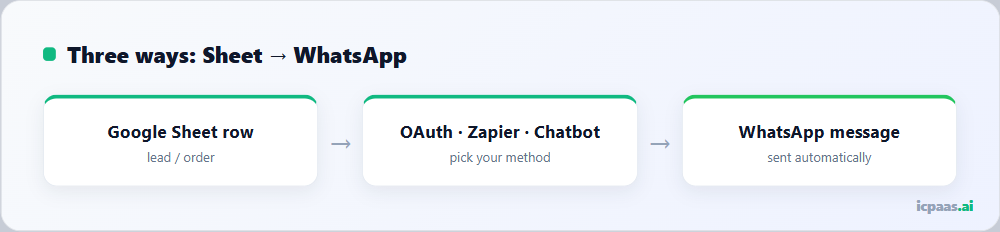
The quick way is a no-code automation platform. Tools like Zapier, Pabbly Connect and n8n already ship a Google Sheets connector, so all the OAuth complexity is handled for you — you click 'Connect account', approve access once, and you are done. You pick a trigger such as 'New or updated row', map the columns to a message, and point the action at icpaas.ai's WhatsApp or SMS API using a simple HTTP action node. A new lead lands in row 240 and a welcome message fires in seconds, with no server to maintain. This is the fastest path from spreadsheet to conversation, and it is how most Indian SMBs should start: minutes to set up, easy to change, and no code to debug at 11 PM.
The chatbot-builder route goes one step further for messaging-first use cases. Inside icpaas.ai's flow and chatbot builder, Google Sheets is a native step — the bot can read a row to personalise a reply or write a row when a customer answers, in real time, without any middleman. So a WhatsApp bot can look up an order number in your sheet and reply with its status, or capture a booking and append it as a new row your team sees instantly. Because the connection lives next to the conversation logic, you skip both the custom OAuth build and the separate automation subscription for anything that starts or ends in a chat.
Which should you choose? If you are shipping a product and need full control, scale and audit trails, invest in the custom Google OAuth integration and call icpaas.ai's REST API directly. If you want to wire Google Sheets to many apps — CRM, ads, payments, messaging — use Zapier, Pabbly or n8n as the glue. And if the workflow is a conversation — a bot that reads from or writes to a sheet — use the chatbot builder's native connection and keep it simple. The good news is these are not mutually exclusive: you can prototype in Zapier this week and graduate the high-volume flows to the API later without changing your customer's experience.
One sign it's time to graduate from a Sheet: when two people are editing the same row, or when you need history and permissions, a spreadsheet starts to strain. The good news is you don't have to switch everything at once — icpaas.ai works the same whether the trigger is a Google Sheet today or a proper CRM tomorrow, so you can start where your data already lives and move the plumbing later without changing what the customer sees on WhatsApp.
Whichever path you take, the layer that actually delivers the message matters most. icpaas.ai is a Meta-authorised WhatsApp Business Solution Provider and a TRAI DLT-registered platform, so a message triggered from a Google Sheet is sent on a compliant, high-deliverability route whether it originated from a no-code Zapier zap, a chatbot flow, or your own OAuth-based code. Start no-code to prove the value, keep your data in the Sheet your team already trusts, and scale into the API only when you need to — all on the same platform, with support that speaks your language.
Ready to Get Started?
Learn how our platform can help you implement these best practices across all your messaging channels.
Related Articles

Integration
Native CRM Integrations: Streamline Your Workflow
Connect your CPaaS messaging platform directly with Salesforce, HubSpot, and other CRMs for unified customer data, automated campaigns, and seamless omnichannel workflows.
Read More →
Integration
What Is a Messaging API, and How Do You Send SMS, WhatsApp & RCS From One Place?
A single, well-documented REST API to send SMS, WhatsApp, RCS and voice from your own applications — no telecom contracts, no fragmented vendors.
Read More →
Integration
How Do You Add SMS, OTP and WhatsApp to Your App? A Developer's Guide (REST, SMPP & SDKs)
Clean REST endpoints, SMPP for high-volume traffic, drop-in OTP verification, sandbox testing and SDKs — everything a developer needs to ship messaging in hours, not weeks.
Read More →Want to Learn More?
Explore our comprehensive platform and see how we can transform your customer communication strategy.